 QDStar
QDStarIC-705 · D-STAR Terminal Mode
A desktop controller and a built-in D-STAR gateway for the Icom IC-705. Link reflectors, see who is on the air and where they are, and follow D-PRS positions and weather stations, from Windows or Linux.
Free software · GPL-3.0


Features
Over WiFi
Talks to the radio with the Icom network protocol (control and CI-V, no audio). No wfview needed.
Built-in gateway
Terminal Mode over USB with its own gateway: DPlus (REF), DCS (DCS, XLX) and DExtra (XRF). No DStarRepeater or ircDDBGateway.
INT and EXT modes
Use the radio's internal gateway with a G3 server, or link reflectors from the PC. Switch with one click.
Link from the radio
In EXT, link, unlink and run an echo test from the radio's UR field, as with ircDDBGateway.
Reflector lists
Your own reflectors plus lists from a URL, a file or a git repository (private ones too), shared with your radio club.
Reflector screen
Reflector state and nodes, the station on the air with name, location, distance and bearing, and the reflector's last heard list.
History
Every over is saved: time, call sign, name, reflector, duration, message and location. Click one to see it again on the screen.
D-PRS
Positions, objects, items and weather reports received, relayed ones included. Manage your own D-PRS beacon from the app.
APRS-IS
Your D-PRS position goes to aprs.fi after every over, and optionally the positions of the stations you hear.
Weather
A card per D-PRS weather station: temperature, humidity, pressure, rain and wind.
System tray
An icon with the station on the air and a notification when someone comes on, with the window out of sight.
Your layout
History, Log, D-PRS and Weather can be detached into their own windows, attached back or hidden.
Updates
QDStar tells you when a new version is out, and the Linux AppImage updates itself after checking the download.
Windows and Linux
Installer for Windows, .deb, AppImage and tar.gz for Linux x86-64 and ARM64 (Raspberry Pi and other mini PCs).
English and Spanish
The interface follows the system language. New translations are welcome.
Screenshots
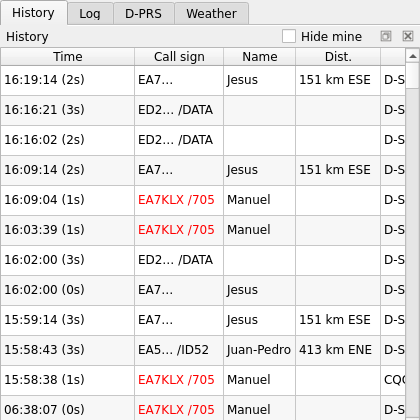
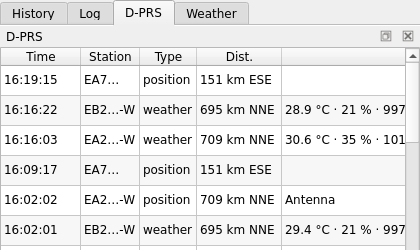
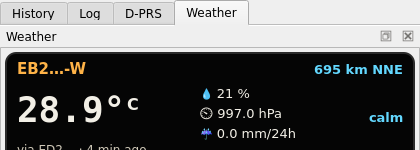
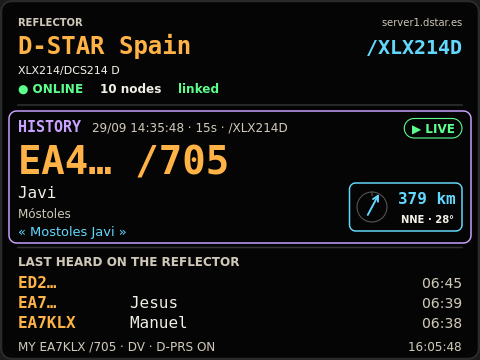
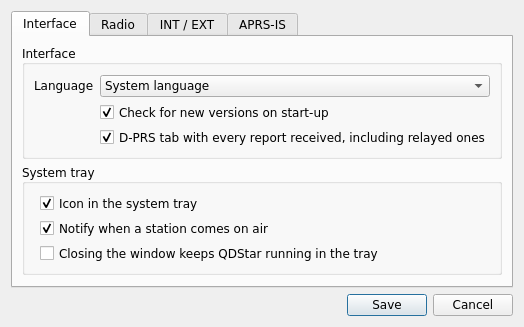
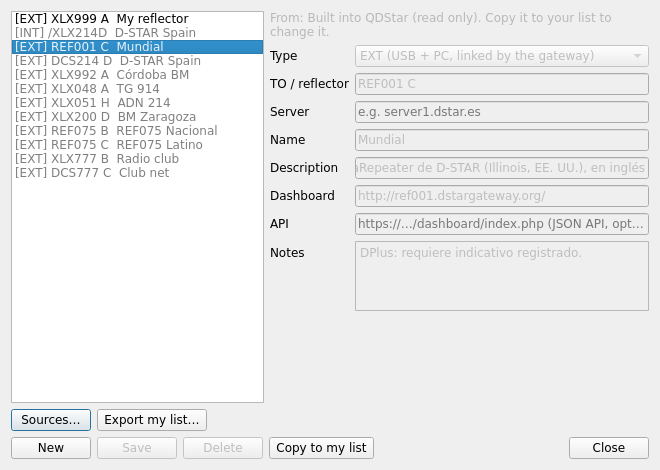
Call signs of other stations are hidden in these images.
Download
Every version is published on GitHub. Pick the file for your system from the list below.
Windows 10/11
64-bit
QDStar-x.y.z-windows-x64-setup.exe RecommendedAn installer that adds QDStar to the Start menu. To update, run the new version's installer: your settings are kept.
QDStar-x.y.z-windows-x64-portable.zipNo installation: unzip it in any folder, or on a USB stick, and run qdstar.exe.
Linux on a PC
x86-64 / amd64
qdstar_x.y.z_amd64.deb RecommendedFor Debian, Ubuntu, Linux Mint and their derivatives. Install it with sudo apt install ./qdstar_x.y.z_amd64.deb.
QDStar-x.y.z-x86_64.AppImageWorks on almost any distribution (Fedora, Arch, openSUSE…). Make it executable and run it: it offers to install itself for your user and then updates itself.
QDStar-x.y.z-linux-amd64.tar.gzThe program as plain files, to unpack wherever you like.
Linux on ARM
arm64 / aarch64: Raspberry Pi 4/5 and other mini PCs with a 64-bit system
qdstar_x.y.z_arm64.deb RecommendedFor Raspberry Pi OS (64-bit, bookworm or later), Debian and Ubuntu.
QDStar-x.y.z-aarch64.AppImageFor other ARM64 distributions. Installs itself for your user and updates itself.
QDStar-x.y.z-linux-arm64.tar.gzThe program as plain files.
x.y.z is the version number. Not sure which Linux you have? Run uname -m: x86_64 means PC (amd64), aarch64 means ARM64. See the manual for installation and radio setup.